Skip to content
MoneyBat Sign inGet started
NewImport statements from any bank

See all your money
in one calm place.

MoneyBat brings every bank, card, loan and investment together, sorts your spending, finds your bills, and plans your goals against what you really earn and spend. No ads. Free for your first two banks.

Read only through Plaid. No card needed to start.

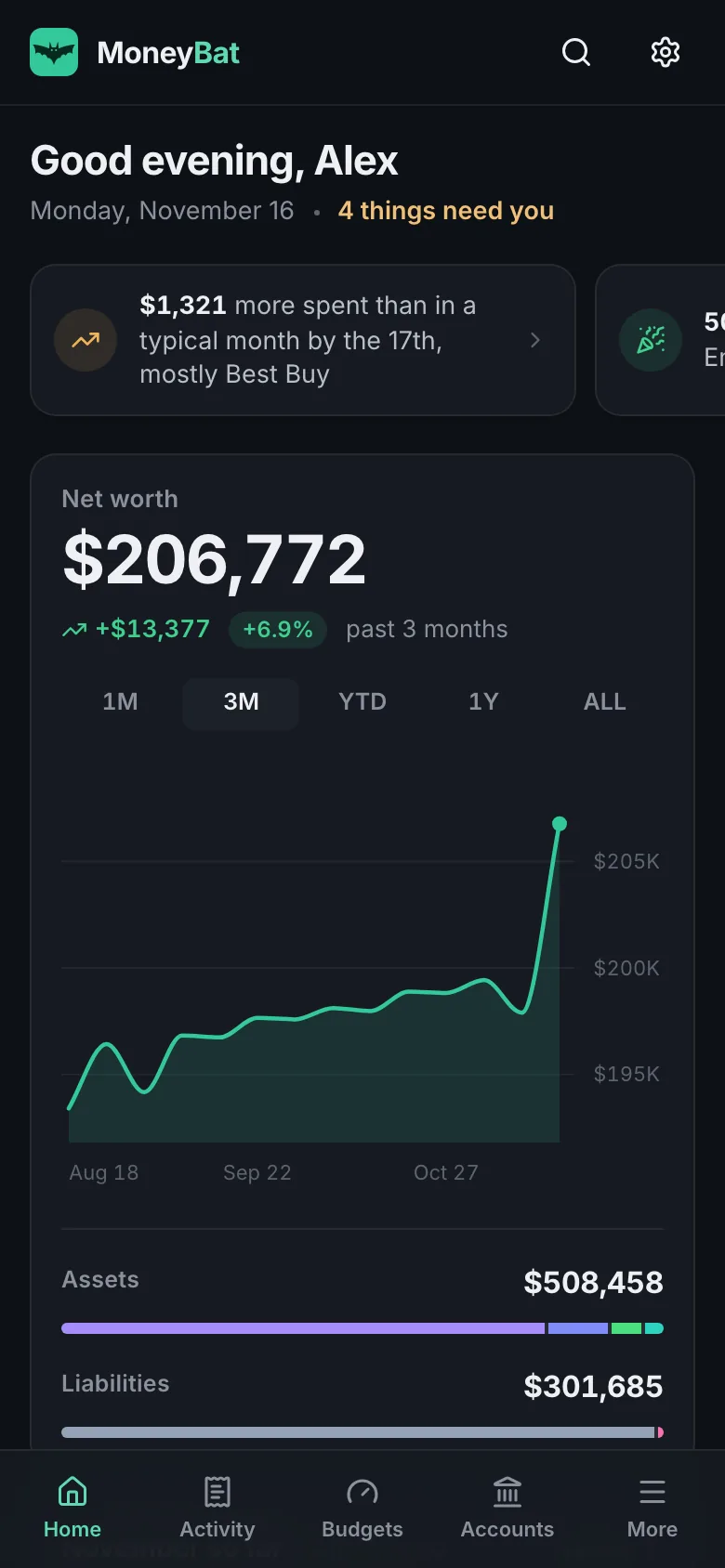
The MoneyBat overview: three Today insights, net worth of $204,072 rising over three months with assets and liabilities by kind, and November so far with spending, income and money left
MoneyBat on a phone: the same overview with bottom tabs
2 years
of history brought in when you connect, where your bank shares it
8 file formats
for statements from any bank, PDF included, when a connection is not an option
0 ads
and no card offers. Subscriptions pay for MoneyBat, not your data.
Read only
MoneyBat can see your accounts. It can never move money.
See everything

Your whole financial life on one screen.

Checking, savings, credit cards, mortgages, student loans, 401(k)s and brokerages connect through Plaid in the US and Canada. Add your home, car, cash and crypto by hand. Your net worth is recorded every day, and you can scrub back to any one of them.

  • Assets and debts by kind, on one line you can scrub
  • Up to two years of history on the first connect, then every change as your bank posts it
  • Loan rates, minimums and due dates where your lender shares them
Scrubbing back through your net worth shows the value on each day
Start with today

Open it and know where you stand.

The Overview starts with today: two or three things worth knowing, worked out from your own numbers. Then this month, drawn as a line against a typical month with a mark for today. Then a short list of what needs you, only when something does.

  • Today insights: a category running high, a price that went up, a milestone reached, income on its way
  • Needs attention: a bill due in three days, a budget ahead of pace, an unusual charge with a Looks right button, a bank to reconnect
  • Nine cards you can move or hide. The layout is yours and it follows you to every device.
The MoneyBat overview: three Today insights, November so far with spending on pace for $5,870 against a typical month, and three things that need attention
Know where it goes

Categories that learn from you.

Every transaction is sorted as it arrives. Fix one and MoneyBat remembers: move a merchant twice and the ones after follow, past ones too. Every change has Undo, so trying things costs nothing.

  • Card payments and moves between your accounts kept out of spending
  • Split a receipt into parts, rename a merchant, add notes, tags and photos
  • Rules for the rest: match a merchant, set the category, run it on the past
Moving a purchase to Home improvement, then undoing it
Keep to a plan

A budget you can actually keep.

One click builds a budget from your last three complete months, rounded up to the next $10. A pace line on every bar shows where you would be spending evenly, so a glance tells you whether this month is fine.

  • By category, or flex: fixed amounts for bills and one pool for everything else
  • Rollover carries what is left, or what went over, into next month
  • An alert at 80 percent, and another if you go over, in the app and by email
Budgets filling up against the pace for the month
Stay ahead

Every bill and subscription, before it lands.

MoneyBat finds recurring charges in your own transactions, adds the card and loan payments your lender reports, and lays them out on a calendar with what is due in the next seven days. When a price moves, you hear about it the day it happens.

  • Price change alerts, up or down, with what it adds up to over a year
  • Plain steps to cancel each service. MoneyBat never cancels for you or asks for passwords.
  • Mark one cancelled and MoneyBat tells you if it charges you again
MoneyBat bills: $4,066 in bills a month, $78 in subscriptions, a notice that Netflix went up from $15.49 to $17.99, about $30 more a year, a calendar of the month and the lists of subscriptions and bills
Investments

Know what you hold, and what it costs you.

Brokerages, 401(k)s and IRAs come in with their holdings. MoneyBat shows each one against what you paid, how your money is spread across stocks, funds, bonds, cash and crypto, and the fees your institution reported in the last twelve months.

  • Holdings with the gain or loss on each, and the total against cost
  • Allocation by asset class, with a value line over time
  • Information only. MoneyBat never trades and never recommends an investment.
MoneyBat investments: four holdings with their gains, an allocation donut of funds, cash, bonds and stocks, and $25 of fees in the last 12 months
The goal planner

Say what you want. Get a plan that fits your real month.

Type a goal the way you would say it. MoneyBat turns it into a plan, checks it against what you actually earn and spend, and shows what would get you there sooner.

  1. 1

    Goals in plain words

    "Pay off my Rewards Visa by June." "20% down on a $500k home in 3 years." "Six months of expenses in savings." You check the amount, the date and the account before anything is saved.

  2. 2

    Checked against your real month

    What you need each month is measured against your average income minus spending: comfortable, tight or not feasible. Debts use your real APR and minimum payments. Slide an extra amount, a new date or a one-off sum and watch the date move.

  3. 3

    Ideas from your own numbers

    "Dining out averages $350 a month. Cutting $75 gets you there 2 weeks sooner." A price rise, two streaming services, bank fees and a tax refund count too. One click sets the budget or a reminder.

  4. 4

    Check-ins that catch you up

    Progress follows your balances. Fall behind and you get a catch-up plan, a new monthly amount or a new date, applied in one click. Milestones get a small celebration.

A goal typed in plain words, checked, saved, then the extra each month slider brings the date sooner
Every number comes from your own transactions, never from the AI. Suggestions are general budgeting guidance, not financial advice.
A MoneyBat goal that fell behind: a new car fund at $2,100 of $12,000, $1,595 behind plan, with two catch-up plans to choose from, keep the date at $762 a month or move it to February 2028, and a check against average income and spending
Ask about your money

Ask in plain words. Get the numbers, not a guess.

The assistant reads only your own MoneyBat data through read only tools, answers with the figures it used, draws them as cards and small charts, and links back to the view they came from. Ask what you spent at a merchant this year, which subscriptions went up, or whether you are on track for your budgets.

  • Figure cards and mini charts built from the data it read, never from its own prose
  • Source chips open Transactions, Budgets, Bills or Trends with the same filters
  • Suggested questions drawn from your own month, and a live line of what it is checking
  • Conversations kept with your account: come back, rename, delete, export
  • Buy or sell questions are refused before they cost anything. About 2 credits per question.
Ask about your money: the question How much did I spend by category this month, and the answer You spent $3,638.66 across 8 categories with a table, a bar chart by category and a Trends source chip
New

Import statements from any bank.

No connection, or a bank Plaid does not cover? Drop the file your bank gives you. MoneyBat reads it, matches it to the right account, finds what is already there, and brings in the rest as one run you can undo with a click.

  • CSV from any bank: any delimiter, one amount column or debit and credit, a header row even under a summary block. If the dates could read either way, one question settles it.
  • Layouts recognised for Chase, Bank of America, Wells Fargo, Capital One, Citi, American Express, TD, RBC, Scotiabank, BMO, CIBC and Tangerine, best effort, and you can fix any column yourself
  • PDF statements with text: the table is found by shape and every amount checked against the running balance. A scan is named as a scan, with the CSV suggested instead.
  • Lines already in MoneyBat are found by the bank's own reference, or by amount, date and description, and skipped unless you tick them
  • Categories from your rules, transfers paired, the layout saved so the next statement is one click, and a monthly reminder for accounts you keep by hand
  • CSV
  • OFX
  • QFX
  • QBO
  • QIF
  • CAMT.053
  • PDF
  • Mint
The import review step: 7 of 9 rows will be imported, two marked already here, a transfer to savings recognised, each row with its category, amount and running balance, and an Import 7 transactions button
Everything in MoneyBat

Nothing left to a spreadsheet.

Every feature in the product today, in one line each. Each line is true to the code, and you can check it in the app in about a minute.

  • Every account

    Checking, savings, cards, mortgages, student loans, 401(k)s and brokerages through Plaid. Home, car, cash and crypto by hand.

  • Statement import

    CSV, OFX, QFX, QBO, QIF, CAMT.053, PDF and Mint files from any bank. Duplicates found, one click Undo.

  • Categories that learn

    45 categories in 12 groups, plus your own. Change a merchant twice and every later one follows.

  • Rules

    Match a merchant or description, then set the category, rename, tag or exclude. Run them on the past too.

  • Splits and receipts

    Split a purchase into up to 20 parts with their own categories. Attach photos or PDFs to any transaction.

  • Transfers and duplicates

    Card payments and moves between your accounts stay out of spending. Doubles are hidden until you say otherwise.

  • Budgets

    By category or flex, rollover, a pace line, one month overrides, and an alert at 80 percent.

  • Bills and subscriptions

    Found from your charges, on a calendar with your lender's due dates, with price change alerts and cancel steps.

  • Net worth and trends

    Recorded every day and scrubbable. Cash flow by month, spending by category and merchant, a year in review.

  • Investments

    Holdings with the gain against what you paid, allocation by asset class, and the fees your institution reported.

  • Goals and the planner

    Goals in plain words, plans checked against your real month, what-if sliders, ideas with their effect, check-ins.

  • Debt planner

    Snowball against avalanche on your real balances, APRs and minimums, with the months and the interest for each.

  • Ask about your money

    Answers from your own data with figure cards, small charts, sources, and conversations you can keep.

  • An Overview you arrange

    Today insights, needs attention, spending pace against a typical month, and nine cards to move or hide.

  • Alerts

    Large purchases, low balances, fees, bills due, budgets, new subscriptions and price changes, reconnects. In the app and by email.

  • A Monday summary

    Last week's spending and income, top categories, the week's bills, your net worth and your goals.

  • Households

    Share with a partner, account by account. Partners can categorise, viewers can only look. On Pro.

  • Credit

    Card utilisation overall and per card, with the APR, minimum and due date, and a debt summary.

  • On your phone

    Install on iPhone or Android. Bottom tabs, swipe to categorise, and no financial data stored on the phone.

  • Fast on a keyboard

    Cmd K to jump anywhere, search transactions or ask a question. Shortcuts for every page. Undo on edits.

  • Light and dark

    Both designed, not inverted. Follows your system, or pin one in Settings.

  • Your data

    Download everything as JSON and your transactions as CSV. Delete everything in one step.

  • API and MCP

    Read only REST and MCP with keys you create, 120 requests a minute, only your own data. On Pro.

  • Security

    Read only through Plaid, confirm it is you, sealed tokens, a strict content policy, 7 day sessions.

And the rest of it

Do it together, hear about it in time, keep what is yours.

Every goal in one place

An emergency fund, a trip, a down payment or a card to clear, each with a progress ring and a check-in that says whether you are on track. A debt planner compares snowball and avalanche on your real balances, with the months and the interest each one takes.

How the goal planner works

MoneyBat goals, each with a progress ring and a check-in: a car fund behind plan, an emergency fund, a Japan trip a third of the way there and a card to pay off

Credit you can act on

Card utilisation overall and per card, with the APR, minimum and due date for every card and loan, and a debt summary.

Credit card utilisation18%Good$1,845 used of $10,000 in limits. Under 30% is generally seen as healthy.

A credit score is coming once a bureau partner is in place. We will never show a made up number.

Share with a partner

One household, two views. Each of you chooses, account by account, what to share. Switch between Mine and Household at the top of any page.

Partners can categorise. Viewers can only look. On Pro.

On every device

Install it on iPhone or Android in two taps, or use it in any browser. Light and dark, both designed. Cmd K to jump anywhere, search or ask.

  • Bottom tabs and swipe to categorise on phones
  • g then d, t, b, a or r for each page, slash to search
  • No financial data stored on the phone

Alerts, in the app and by email

Each one can be turned off, and the amounts are yours to set.

  • A large purchase, $500 by default
  • A low balance in checking or savings
  • A bill due in three days
  • A budget near its limit, or over
  • A subscription that went up, or down
  • A charge after you cancelled
  • A bank fee
  • A bank that needs reconnecting

A Monday summary

One email at the start of the week: what you spent and earned last week, your top three categories, the bills due in the next seven days, your net worth today and where your goals stand. Preview it any time in Settings.

  • Everything exportable as JSON, transactions as CSV
  • Delete everything, bank connections first
  • A read only API and MCP for your own tools
For everyone who misses Mint

Bring your Mint history with you.

If you saved Mint's CSV export, MoneyBat reads it as it is. Every Mint account in the file is listed, you match each one to a MoneyBat account in one go, and dates, amounts, debits and credits come across. Mint categories are mapped to ours where the names line up, and lines already there are skipped.

  1. Connect your banksYour accounts and up to two years of recent history arrive on their own.
  2. Import your Mint fileAccounts, Import a statement. Match each Mint account once; MoneyBat remembers.
  3. Pick up where you left offBudgets, bills and trends now reach back as far as your history does.
Trust

Built to see your money, never to touch it.

MoneyBat is paid for by subscriptions. That keeps the incentives simple: no ads, no offers, no selling what you share with us.

Read only

MoneyBat can see balances and transactions. It cannot pay, transfer, trade or cancel anything.

Your password stays with your bank

You sign in at your bank inside Plaid's secure window. MoneyBat never sees or stores your bank password.

Confirm it is you

A passkey, an authenticator app or an emailed code before any bank connects, before an export and before deleting.

Encrypted and sealed

Bank access tokens are encrypted with AES-256-GCM, kept on our servers and never sent to a browser. HTTPS everywhere, 7 day sessions.

No ads. No selling.

We do not sell or rent your data, show ads, or use it for credit offers. Statement files are read in memory and dropped unless you choose to keep them.

Leave any time

Download everything as JSON or CSV. Delete everything removes your bank connections at Plaid first, then your data.

Compare

The good parts of each, none of the catch.

FeatureMoneyBatFree, ad supported appsSubscription only apps
A free planYes, 2 banksYesUsually a trial
Ads or card offersNeverThroughoutUsually none
Price for everything$10.99 a monthPaid for by offersAbout $8 to $15 a month
Budgets with rolloverYesOften basicUsually
Import statements, PDF included8 formats, any bankRarelyCSV, sometimes
Goals checked against real incomeYes, with what-if slidersRarelySome
Share with a partnerAccount by accountRarelyOften
Ask about your own moneyYes, with sourcesRarelySome
Export everythingJSON and CSV, any timeOften limitedVaries
iPhone, Android and the webAll threeVariesVaries
Credit scoreNot yetOftenRarely

Categories, not products: ad supported apps include the old Mint; subscription only apps include Monarch, Copilot and YNAB. Features and prices change often, so check each product.

Pricing

Free for your first two banks.

Pro connects everything and covers every OfficeBats app. Plaid charges us for each connected bank every month, which is why Free connects two. Imports and manual accounts cost us nothing, so they are free in every format.

FreeFor getting the full picture
$0 forever
  • Connect up to 2 banks or institutions
  • Budgets, bills, net worth, alerts, and goals with a plan
  • 10 manual accounts and statement import in every format
  • 24 months of trends
  • 300 AI credits a month for the assistant and the goal planner
Get started free
ProFor households and many accounts
$10.99 a month

or $109.90 a year

  • Connect every bank, card, loan and investment
  • Share with a partner, account by account
  • Unlimited history and manual accounts
  • Read only API and MCP for your own tools
  • 5,000 AI credits a month, shared by every Bats app
  • Pro in every OfficeBats app
Get Pro

Full pricing. Prices in US dollars; cancel any time.

Questions

Good questions, straight answers.

Is MoneyBat a Mint replacement?

Yes. It does what people used Mint for: every account in one place, automatic categories, budgets, bills, net worth, trends, goals and alerts. It also does what Mint never did well: rollover and flex budgets, splits and receipts, statement import from any bank, sharing with a partner, a goal planner, and an assistant that answers questions about your own money. There are no ads and no card offers.

Is it safe to connect my bank?

MoneyBat connects through Plaid and its access is read only: it can see balances and transactions, and it can never pay, transfer, trade or cancel anything. You sign in to your bank inside Plaid's window, so your bank password never reaches MoneyBat. Before any bank connects, you confirm it is you with a passkey, an authenticator app or an emailed code. Bank access tokens are encrypted with AES-256-GCM and never sent to a browser. Security details.

Is my bank supported?

Most likely. Plaid connects thousands of banks, credit unions, card issuers, lenders and brokerages in the US and Canada, and you can search for yours before you sign up by starting to connect. If yours is missing, add the account by hand and import its statements: CSV, OFX, QFX, QBO, QIF, CAMT.053, PDF files all work, and layouts from Chase, Bank of America, Wells Fargo, Capital One, Citi, American Express, TD, RBC, Scotiabank, BMO, CIBC and Tangerine are recognised.

What files can I import?

CSV from any bank (one amount column or debit and credit, any delimiter, a header row even under a summary block), OFX, QFX from Quicken, QBO from QuickBooks, QIF, CAMT.053 XML, PDF statements that contain text, and Mint's export. Files can be up to 20 MB and 20,000 transactions. Scanned PDFs have no text to read, so MoneyBat says so and suggests the CSV or OFX download of the same statement. Every import is one run you can undo with a click.

What does it cost?

Free connects up to 2 banks or institutions and includes budgets, bills, net worth, goals, alerts, manual accounts and imports. Pro is $10.99 a month or $109.90 a year. It connects as many as you like, adds sharing with a partner, unlimited history and the API, and gives you Pro in every OfficeBats app. Cancel any time.

Why does Free connect only two banks?

Plaid charges us for every connected bank, every month. Capping Free at two keeps it free for real, without ads and without selling data. Manual accounts and statement imports cost us nothing, so they are included in every format.

Will MoneyBat shut down like Mint did?

No one can honestly promise forever, so here is what we can promise. Mint was free because it sold card and loan offers; MoneyBat is paid for by people on Pro, so the people it serves are the people who pay for it. It is part of OfficeBats, a family of apps that share one account and one plan, so it does not stand alone. And you can download everything, any time, as JSON or CSV, so your history is never trapped.

Can I bring my Mint history?

Yes, if you saved Mint's CSV export. Mint put every account in one file; MoneyBat reads it as it is, lists each Mint account, and you match them to your MoneyBat accounts in one go. Dates, amounts, debits and credits come across, Mint categories are mapped to ours where the names line up, and lines already there are skipped.

Can my partner and I use it together?

Yes, on Pro. Invite them with their OfficeBats account. Nothing is shared until each of you turns on sharing for an account, so you can keep some accounts private. Partners can categorise shared transactions; viewers can only look.

Do you show a credit score?

Not yet. We will add one once a credit bureau partner is in place, and we will never show a made up number. Today MoneyBat shows your card utilisation, overall and per card, with the APR, minimum and due date for each card and loan, the parts you can act on.

How does the goal planner work?

Type a goal the way you would say it, like "Save $8,000 for Japan next summer" or "Pay off my Rewards Visa by June". MoneyBat reads it into an amount, a date and the account it belongs to, and you check it before anything is saved (or fill in a form instead). The plan is then checked against your average income minus spending over your last complete months, with your card and loan rates for debts. Every number is worked out from your own data, never made up by the AI. Reading a goal with AI uses about 3 credits from your OfficeBats wallet; simple rules read common phrasings for free, and everything else in the planner works without AI.

Is the assistant or the goal planner financial advice?

No. The assistant answers questions about your own data (what you spent, what is due, how your net worth changed) and shows the numbers it used. The goal planner works out plans and ideas from your own spending, such as a budget for dining out or a subscription that went up; those are general budgeting guidance, not financial advice. Neither recommends investments or gives tax or legal advice, and a question about what to buy or sell is refused before it costs anything. Each question uses a few credits from your OfficeBats wallet.

Take one calm look at all your money.

Free for your first two banks. Connect, or drop in a statement, and see your net worth, your budget and what is due in about a minute.